Key Takeaways
- Your LinkedIn profile isn't just an online resume anymore – it's your digital first impression, your networking hub, and honestly? It might be the difference between getting that interview or getting lost in the pile.
- Before you start applying to jobs, you need to make sure your profile is actually working for you. We're talking about keyword optimization, a headline that doesn't bore people to death, and showing up in recruiter searches.
- Also, get this sorted first because once you've got a solid profile, tools like Linked CV Builder can turn it into an ATS-optimized resume in about 5 minutes.

Ready to turn your LinkedIn into job offers? Paste your LinkedIn profile link – build ATS CV in 5 minutes with Linked CV Builder.
Why Your LinkedIn Profile Matters More Than You Think
Look, I'll be honest with you. Most people treat LinkedIn like it's some boring obligation. They slap up a profile, add their job title, maybe upload a photo from 2016, and call it a day.
Big mistake.
Recruiters are searching LinkedIn constantly. Every single day, they're hunting for people who match specific job requirements. If your profile isn't optimized, you're invisible. You could be the perfect candidate for a role and never even know it existed because the recruiter's search skipped right over you.
67 million companies are on LinkedIn right now. Seven people get hired through the platform every minute. But here's the kicker: most profiles are terrible. Which means if you actually put in the effort, you're already ahead of like 80% of your competition.
Start With Your Headline (Because It's Not Just Your Job Title)
Your headline is prime real estate. It shows up in search results, it's the first thing people see, and most people completely waste it by just putting "Marketing Manager at XYZ Corp."
Cool. So are 10,000 other people.
Instead, use those 220 characters to actually say something. What do you do? What problems do you solve? What makes you different?
Bad headline: "Software Engineer at Tech Company"
Better headline: "Full-Stack Developer | React & Node.js | Building scalable SaaS products that don't crash at 3am"
See the difference? The second one has keywords (React, Node.js, SaaS), personality, and it tells people what you actually do. Recruiters searching for "React developer" or "SaaS" will find you. The generic title? Lost in the void.
Don't overthink it though. Just think about what someone would type into LinkedIn if they were looking for someone like you... and put those words in your headline.
The About Section Is Where You Actually Sell Yourself
This is where most people completely fumble. They either:
- Write a boring chronological history of their career (nobody cares).
- Sound like a robot wrote it.
- Leave it blank (please don't).
Your About section should tell your story. Who are you? What do you do? Why should someone care?
Start with a hook – something that grabs attention. Then get into what you're good at, what you've accomplished, maybe throw in some personality. Use first person ("I help companies..." not "Jane helps companies..."). And for the love of god, use short paragraphs and white space. Nobody wants to read a wall of text.
Also? Keywords. Think about what skills, tools, or industry terms recruiters might search for and naturally work them in. If you're a data analyst who works with Python, SQL, and Tableau – mention those specifically.
And here's a trick: write it like you're explaining what you do to someone at a party. Not a job interview. A party. Much more interesting that way.
Experience Section: More Than Just Copying Your Resume
Don't just list your job duties. Everyone does that and it's boring as hell.
Focus on accomplishments. What did you achieve? What problems did you solve? Use numbers whenever possible because numbers are concrete and impressive.
Bad: "Responsible for managing social media accounts"
Better: "Grew Instagram following from 2K to 47K in 8 months through content strategy focused on user-generated content and influencer partnerships"
See? One tells me you had a job. The other tells me you're actually good at it.
Also, LinkedIn lets you add media to your experience section. Use it! Add presentations, articles you wrote, projects you worked on. It makes your profile way more interesting and gives recruiters more reasons to reach out.
Skills Section (And Why You Need to Be Strategic)
LinkedIn lets you add up to 50 skills to your profile. Don't. It looks desperate and dilutes the important ones.
Pick 10-15 skills that are most relevant to the jobs you want. Put the most important ones at the top – those are the ones that show up on your profile and in search results.
Then – and this is important – get endorsements for those skills. Ask colleagues, former managers, people you've worked with. Endorsements don't mean as much as they used to, but they still help with credibility and search ranking.
LinkedIn also has skill assessments you can take. Pass one and you get a little badge on your profile. Takes like 15 minutes and makes you look more credible. Worth it.
Recommendations Are Gold (Ask for Them)
This one's simple but most people are too shy to do it: ask for recommendations.
A recommendation from a former boss or colleague is basically a reference letter that's publicly visible. It's social proof that you're not just making stuff up about being great at your job.
Don't ask everyone you've ever worked with. Be strategic. Ask people who can speak to specific skills or achievements that are relevant to the jobs you want. Make it easy for them – offer to draft something they can edit.
And yeah, write recommendations for other people too. It's good karma and they'll often return the favor.
Get Your URL Cleaned Up
Your LinkedIn profile URL probably looks something like linkedin.com/in/john-smith-b4729a183 right now.
Change it to linkedin.com/in/johnsmith or linkedin.com/in/johnsmith-marketing or whatever makes sense for you.
It's cleaner, more professional, and easier to share on resumes and email signatures. Takes 30 seconds to do in your settings.
Turn On "Open to Work" (But Maybe Use the Private Setting)
LinkedIn has a feature where you can signal to recruiters that you're open to new opportunities. You can either:
- Show it publicly (green #OpenToWork frame around your photo).
- Keep it private (only recruiters see it).
If you're currently employed and don't want your boss seeing that you're job hunting... use the private setting. Recruiters will still see it and reach out.
If you're unemployed or don't care who knows you're looking? Go public. You'll get more messages.
Either way, be specific about what roles you're interested in, what locations you're open to, and what type of work (remote, hybrid, on-site). The more specific you are, the better quality messages you'll get.
Engagement Actually Helps (Post Something Occasionally)
I'm not saying you need to become a LinkedIn influencer posting motivational quotes every day. Please don't do that.
But engaging on LinkedIn – commenting on posts, sharing articles, occasionally posting something yourself – makes you more visible. The algorithm favors active users.
You don't need to post every day. Once or twice a week is plenty. Share something useful, comment thoughtfully on other people's posts in your industry, celebrate wins. Just be human about it.
And here's a bonus: when you engage with content from companies you want to work for, their employees and recruiters might notice. It's a subtle way to get on someone's radar.
The Little Things That Make a Difference
Some quick wins:
- Fill out the "Featured" section with your best work.
- Add volunteer experience if relevant.
- Include certifications and courses (LinkedIn Learning ones show up automatically).
- If you speak multiple languages, add them.
- Make sure your location is accurate (recruiters filter by location).
- Turn on Creator mode if you plan to post regularly.
And check your privacy settings. You probably want recruiters to be able to find you and message you. Make sure those aren't turned off.
Now What? Turn That Profile Into Results
Okay, so you've optimized your LinkedIn profile. Great. Now what?
Here's the thing: when you start applying to jobs, you still need a proper resume. And not just any resume – one that's tailored to each specific job, optimized for ATS systems (those robots that scan your resume before a human ever sees it), and actually highlights the right stuff.
Most people either:
- Send the same generic resume to every job (doesn't work).
- Spend hours manually tweaking their resume for each application (exhausting).
- Give up and apply to fewer jobs (not ideal).
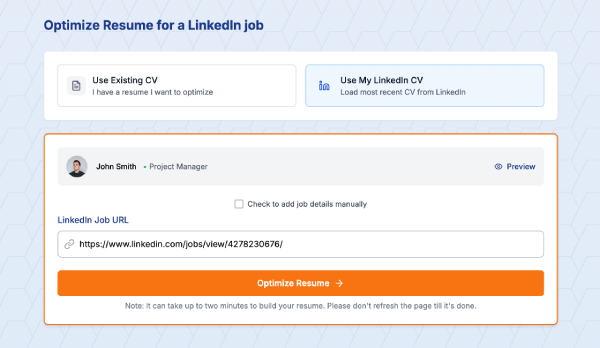
That's where Linked CV Builder comes in. You've already done the hard work of building an awesome LinkedIn profile. Now you can turn it into a professional, ATS-optimized resume in about 5 minutes.
The AI reviews your profile and the job you're applying to, suggests skills that'll help you stand out, and creates a resume that's actually tailored to that specific role. Then you can do the same thing for the next job, and the next one. People using it are seeing 3X more responses from recruiters.
It's honestly kind of a no-brainer if you're serious about job hunting. Your LinkedIn profile gets you found. A tailored, optimized resume gets you interviews.
Paste your LinkedIn profile link – build ATS CV in 5 minutes with Linked CV Builder.
Final Thoughts
Look, optimizing your LinkedIn profile isn't rocket science. But it does take some actual effort and thought. Most people don't bother, which is exactly why doing it gives you such an advantage.
Spend a few hours this weekend getting your profile dialed in. Update your headline, rewrite your About section, add some accomplishments to your experience, clean up your skills, ask for a few recommendations.
Then when you start applying to jobs, you'll be showing up in recruiter searches, your profile will make a strong impression when people check you out, and you'll have a solid foundation to build targeted resumes from.
Your future employed self will thank you.
Written by Di Reshtei