Key Takeaways
- LinkedIn's PDF export creates formatting nightmares for ATS systems (85% of companies use these).
- Recruiters spend 5-10 seconds scanning your CV – broken formatting = instant rejection.
- A proper ATS-optimized CV gets you 3X more recruiter responses.
- Converting LinkedIn to professional format takes 5 minutes with the right tool.
Ready to stop getting ignored? Paste your LinkedIn profile link and build an ATS-optimized CV in 5 minutes with Linked CV Builder.

Look, I've been down this road. You spend hours perfecting your LinkedIn profile, getting endorsements, writing thoughtful summaries. Then you see a job posting and think "I'll just download my profile as PDF and send it over."
Big mistake.
Here's the thing nobody tells you: that LinkedIn PDF export? It's basically designed to make recruiters hate you.
What Actually Happens When You Send a LinkedIn PDF
You hit that export button and LinkedIn gives you a nicely formatted PDF. Looks great on your screen. Maybe you even showed it to your friend who said "wow, looks professional!"
But here's what recruiters see:
The ATS (Applicant Tracking System) chokes on it. Immediately. LinkedIn's export format uses tables, columns, weird spacing... all the stuff that makes automated systems completely lose their minds. Your "Senior Marketing Manager" title? The system reads it as "S e n i o r M a r k." Your carefully listed skills get jumbled into one long incomprehensible string.
I'm not exaggerating. A recruiter at a Fortune 500 told me they auto-reject any LinkedIn PDF exports because "we literally can't read what the system spits out."
The 5-Second Rule (and Why Your LinkedIn PDF Fails It)
HR gives your CV about 5 seconds. That's it.
In those 5 seconds, they're scanning for:
- Clear job titles.
- Relevant skills.
- Clean, readable format.
- Keywords that match the job description.
Your LinkedIn PDF has none of this optimized. The format's all wrong. Skills are buried. Job descriptions are either too verbose or too vague because you wrote them for networking, not job applications.
It's just... not built for this purpose.
What Makes a Professional ATS CV Different?
An actual ATS-optimized CV (like what you'd get from linkedcvbuilder.com) is built specifically for two audiences: the robot (ATS) and the human (recruiter).
The robot needs:
- Clean single-column layout.
- Standard section headers (Experience, Education, Skills).
- No tables, no text boxes, no fancy graphics.
- Keywords from the actual job posting.
The human needs:
- Scannable bullet points.
- Quantified achievements.
- Relevant skills highlighted up top.
- A format that doesn't make their eyes bleed.
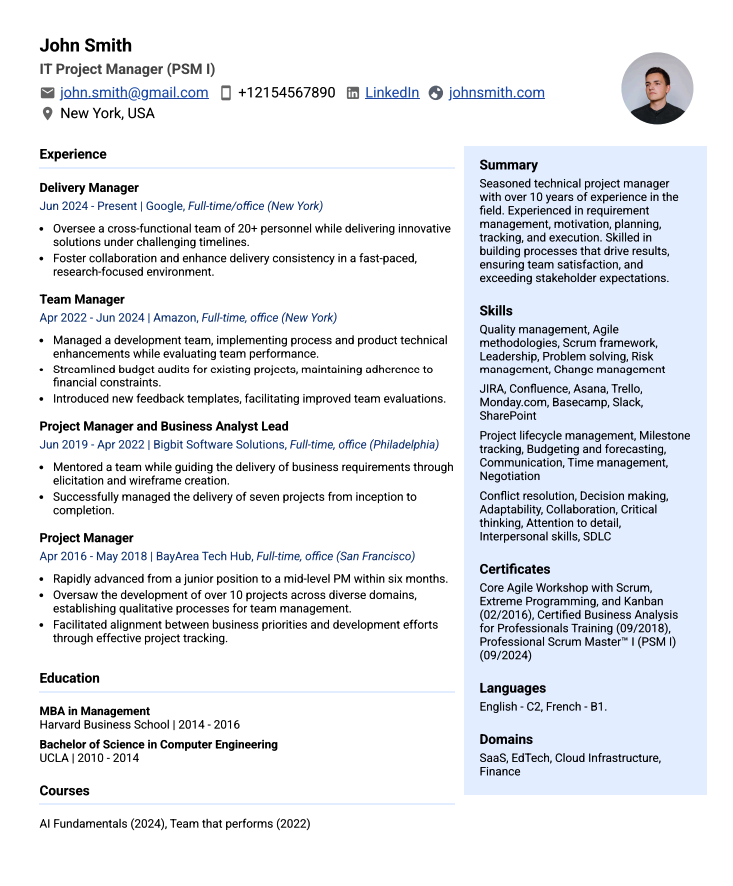
You can't do this with a LinkedIn export. You just can't.
"But My LinkedIn Profile is Complete..."
Yeah, mine was too. 100% complete according to LinkedIn's own metric.
Still got nowhere with the PDF export.
Because completeness on LinkedIn means you filled in all the networking fields – volunteer experience, courses you took in 2018, every single recommendation. That's great for building your network. Terrible for a focused job application.
A proper CV pulls the relevant stuff from your background and tailors it to the specific role. LinkedIn's just a data dump of everything you've ever done.
The Real Cost of Using LinkedIn PDFs
Let's do some quick math. Say you apply to 20 jobs using your LinkedIn PDF export. Maybe 2-3 actually make it through the ATS properly. That's a 10-15% success rate.
Now use a properly formatted ATS CV. Same 20 jobs. Suddenly 15-18 make it through. That's 75-90%.
The difference? One tool gets you ignored. The other gets you interviews.
Customers using proper ATS-optimized CVs see a 3X increase in response rates. That's not marketing fluff – that's just what happens when recruiters can actually read your application.
"Can't I Just Reformat the LinkedIn PDF Myself?"
Sure. If you have 2-3 hours per application and really understand ATS requirements.
Most people don't. They move some text around, change the font, think they're done. The ATS still can't parse it properly because the underlying structure is wrong.
I tried this myself. Spent a whole afternoon reformatting. Applied to 10 jobs. Got zero responses. Turned out I'd somehow made it worse by introducing new parsing errors.
The Speed Factor Nobody Talks About
Here's something else: most good jobs get 100+ applications in the first 48 hours. After that, you're basically invisible.
If you're manually reformatting your LinkedIn export for each application, you're already too late. By the time you finish customizing for Job #1, the position's flooded with other candidates.
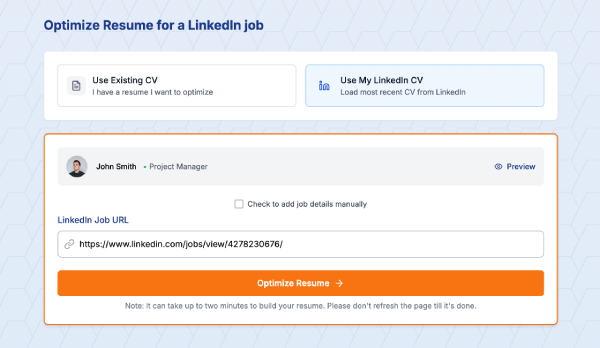
Tools like Linked CV Builder do this in under 5 minutes. You paste the LinkedIn job URL, the AI extracts requirements, matches them to your profile, and spits out a tailored CV. You're applying while other people are still fiddling with margins in Word.
When LinkedIn PDF Might Actually Work
Okay, there are exactly two scenarios where a LinkedIn PDF is fine:
- The recruiter specifically asks for it (rare).
- You're sending it as supplementary material alongside a proper CV.
That's it. That's the list.
For 99% of job applications, you need something built for the purpose. Not a social media profile masquerading as a resume.
What Recruiters Actually Want to See
I asked a few recruiters what makes them pay attention. Here's what they said:
"Clean format. I don't want to hunt for information."
"Match the keywords in our job posting. Show me you read it."
"Quantify your achievements. 'Increased sales' means nothing. 'Increased sales 34% in Q3' – now we're talking."
"Please, for the love of god, use a single column format."
None of that happens with a LinkedIn export. LinkedIn doesn't know what job you're applying for. Can't tailor keywords. Doesn't optimize format for ATS.
The Cover Letter Problem
Oh, and LinkedIn doesn't generate cover letters. At all.
Most applications need one. You're now writing that from scratch while trying to customize your LinkedIn PDF while racing against the 48-hour application window.
Or you could use a tool that generates both – tailored CV and cover letter – in one go. Your call.
Bottom Line
LinkedIn is incredible for networking. For building your professional presence. For staying connected.
But for job applications? The PDF export is basically sabotaging yourself.
You need something that:
- Passes ATS systems (not optional anymore).
- Looks professional to human eyes.
- Tailors content to specific job postings.
- Saves you massive amounts of time.
- Actually gets you responses.
That's what a proper CV builder does. LinkedIn's export feature? Not designed for this. Never was.
Stop sending LinkedIn PDFs into the void. Get a proper ATS-optimized CV that recruiters actually want to read. Try Linked CV Builder now – paste your LinkedIn profile and get a professional CV in 5 minutes.
The next job you apply to could be the one that changes everything. Don't blow it with bad formatting.
Written by Di Reshtei