Key Takeaways
Your LinkedIn profile is sitting there with all your experience already written. Why waste hours reformatting it into a CV when you can convert it in minutes?
The trick is making sure it actually passes ATS systems and doesn't look like garbage when a real human finally reads it. We're talking about turning that digital resume into something that gets you callbacks, not rejections.
Ready to skip the manual work? Paste your LinkedIn profile link – build ATS CV in 5 minutes with Linked CV Builder →
Look, I'll be honest. Most people are doing this completely wrong.
They're copy-pasting chunks from LinkedIn into Word documents at 11 PM, trying to remember if "synergized cross-functional teams" sounds better than "worked with different departments." It's exhausting. And here's the kicker – even after all that effort, their CV gets auto-rejected by some algorithm before a human ever sees it.
2026 is different though. The tools got smarter, ATS systems got pickier, and the gap between a decent CV and one that actually works has never been bigger.
Why Your LinkedIn Profile Isn't Job-Ready (Yet)
Your LinkedIn profile was built for networking. For scrolling. For that recruiter who might stumble across you while searching "Python developer Chicago."
A CV? That's a weapon. It needs to cut through applicant tracking systems, survive the 5-second HR scan, and make someone think "yeah, we need to talk to this person."
They're not the same document. Not even close.
LinkedIn lets you ramble. You can write paragraphs about your passion for sustainable tech or how you "leveraged innovative solutions." On a CV, that stuff dies. You've got bullet points, action verbs, and maybe 10 seconds of attention if you're lucky.
The ATS Problem Everyone Ignores
Applicant Tracking Systems are basically the bouncers of job applications. And they're brutal.
Research shows around 75% of resumes never reach human eyes because ATS software filters them out first. It's scanning for keywords, looking at formatting, checking if your experience matches the job description. Miss those targets and you're done. Doesn't matter how qualified you actually are.
Your LinkedIn profile probably has the right experience but wrapped in the wrong words. You wrote "managed team communications" when the job posting says "coordinated stakeholder engagement." To a human, same thing. To an ATS? Completely different.
This is where most DIY conversions fall apart.
What Actually Needs to Change
Converting LinkedIn to CV isn't just reformatting. You need to:
Strip the fluff. LinkedIn loves soft skills and personality. "Passionate team player with a growth mindset" sounds great on a profile. On a CV it's wasted space. Replace it with quantifiable achievements. Numbers, percentages, actual impact.
Match the job keywords. Every position you apply for has different requirements. Your CV needs to mirror that specific job description. Not in a creepy robotic way, but enough that the ATS recognizes you're qualified. This means you can't just have one master CV anymore.
Fix the formatting. LinkedIn uses a web layout. CVs need clean, ATS-friendly templates. No fancy graphics, no weird fonts, no text boxes that confuse the parsing software. Just straightforward sections that both robots and humans can read.
Reorganize priorities. What shows up first on your LinkedIn (maybe your intro paragraph or featured posts) isn't what should lead your CV. Experience and skills relevant to this specific job come first.
The Manual Method (If You Hate Yourself)
You can do this by hand. People do it all the time.
First, export your LinkedIn data. Go to Settings & Privacy, then Data Privacy, then "Get a copy of your data." Wait for the download. Open the files. Realize they're in some weird format that doesn't help much.
Start a new document. Copy your experience section. Rewrite every bullet point to include metrics. "Led marketing campaigns" becomes "Increased conversion rates by 34% through targeted email campaigns reaching 50K+ subscribers."
Do this for every job. Every project. Every achievement.
Now compare to the job posting. Highlight keywords. Adjust your CV to include those exact terms naturally. Repeat for the next job application. And the next. And the next.
It works. But it'll take you 2-3 hours per application if you're thorough.
The Smart Way: Automated Conversion Tools
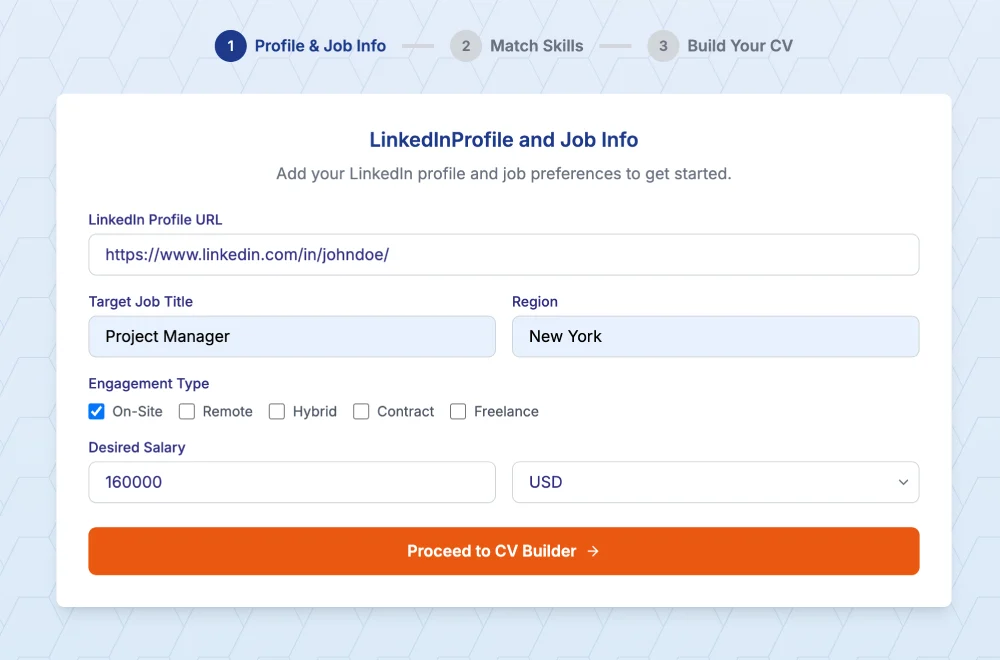
Here's where things get interesting. Tools like Linked CV Builder changed the game because they handle the grunt work automatically.
You paste your LinkedIn URL. The AI pulls your profile, analyzes the target job, and generates a CV that's actually optimized for that specific role. It suggests skills you might've missed, rewrites your experience with stronger action verbs, and formats everything for ATS compatibility.
The whole process takes about 5 minutes instead of 2 hours. And you can generate different versions for different jobs without starting from scratch each time.
I know how this sounds. Like I'm shilling for a product. But after watching friends manually convert their profiles for the hundredth time, there's something to be said for just getting it done fast and moving on with your life.
ATS Optimization: The Technical Stuff
Let's get into the weeds for a second.
ATS systems parse your CV looking for specific data points. Contact info, work history, education, skills. If your formatting is weird, it can't extract that data properly. You might have 10 years of relevant experience but the system thinks you're entry-level because it couldn't parse the dates correctly.
Use standard section headers. "Work Experience" not "My Professional Journey." "Education" not "Academic Background." Keep it boring and predictable.
Stick to common fonts. Arial, Calibri, Georgia. Nothing decorative.
Save as .docx or PDF. Most ATS systems handle both now, but .docx is safer. Some older systems choke on PDFs.
Don't use tables or columns. The parsing software reads left-to-right, top-to-bottom. Multi-column layouts confuse it.
Include keywords naturally. If the job mentions "project management" six times, your CV should mention it too. But write like a human, not a keyword-stuffing bot.
The Skills Section Strategy
This is where LinkedIn actually helps.
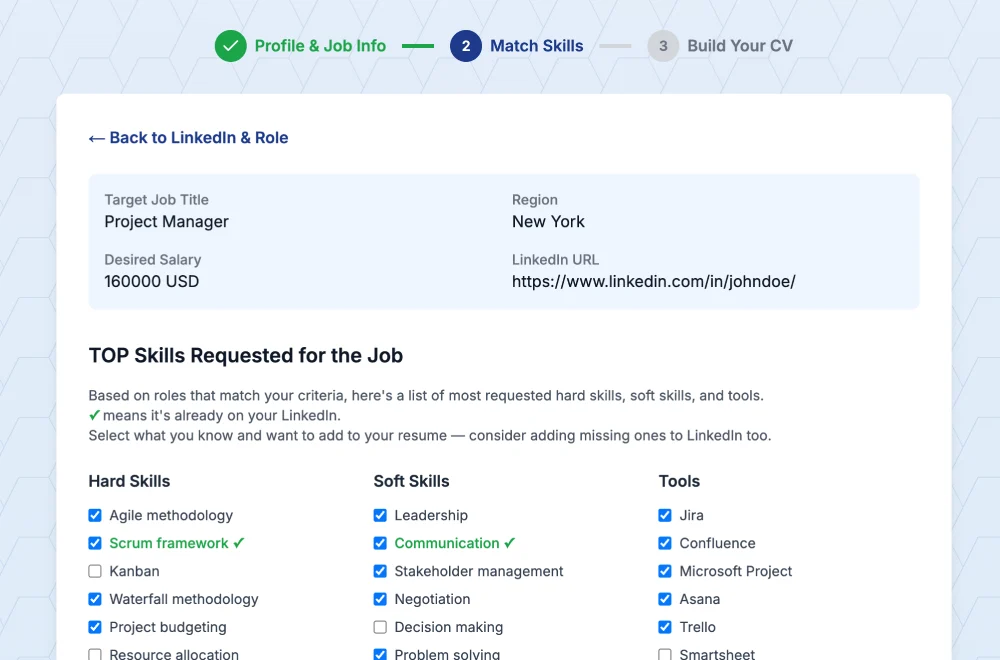
Your LinkedIn skills section shows endorsements. Those popular skills? Put them on your CV if they're relevant. But don't just copy the list verbatim.
Organize skills by category. Technical skills, soft skills, tools/software. Match them to the job requirements. If the posting wants "Python, SQL, Tableau" and you have all three, they better be prominent on your CV.
And here's a move most people miss: look at the "Skills & Endorsements" section of people who already work at the company you're applying to. What skills do they highlight? Add relevant ones to your CV. It's not cheating, it's strategic.
Cover Letters Nobody Talks About
Quick tangent. You spent all this effort on your CV. Don't blow it with a generic cover letter.
If you're using a tool to convert your LinkedIn profile, check if it generates cover letters too. Good ones analyze the job posting and write something specific to that role. Not just "I'm excited about this opportunity" but actual connections between your experience and their needs.
Save yourself another hour.
Common Mistakes That Kill Applications
Leaving old dates. Your LinkedIn shows you're currently employed. Your CV says you left that job in 2023. Instant red flag.
Inconsistent job titles. LinkedIn says "Marketing Specialist." CV says "Digital Marketing Coordinator." Which one is true? Hiring managers notice this stuff.
Too much information. LinkedIn can be exhaustive. Your CV shouldn't be. If a job was 7 years ago and irrelevant, summarize it in one line or cut it entirely.
Ignoring the summary section. LinkedIn headlines work on LinkedIn. On a CV, your summary needs to be a tight 2-3 sentence pitch that screams "I'm perfect for this specific role."
Not customizing. I can't stress this enough. One generic CV doesn't work anymore. You need versions. Tailored versions. For every serious application.
Testing Your Converted CV
Before you start applying, run some checks.
Upload your CV to a free ATS scanner. There are tools online that show you how well your resume would score. They'll flag missing keywords, formatting issues, sections the system might miss.
Read it out loud. Does it sound like something you'd actually say? Or does it read like a robot wrote it? Even if the ATS loves it, a human still needs to want to interview you.
Check for typos. Sounds obvious but everyone misses something when they're rushing.
The Reality Check
Converting your LinkedIn to a CV in 2026 isn't optional anymore. It's the baseline.
Companies are getting hundreds of applications. The ones with perfectly optimized resumes get interviews. The ones with "pretty good" resumes get ignored.
You can spend hours doing this manually, learning the ins and outs of ATS optimization, rewriting the same bullet points over and over. Or you can automate it and spend that time preparing for interviews instead.
I'm not saying tools do everything. You still need to review what they generate, make sure it sounds like you, add personal touches. But they handle the tedious 80% so you can focus on the 20% that actually matters.
What This Looks Like in Practice
Let's say you're applying for a Senior Product Manager role. Your LinkedIn profile is solid – 8 years of experience, good endorsements, detailed project descriptions.
You paste your profile into Linked CV Builder. Add the job URL. Five minutes later you've got a CV that:
- Opens with a summary that mentions the exact skills from the job posting
- Restructures your experience to highlight product launches and team leadership
- Adds metrics you forgot about (you did increase user retention by 28%, you just never quantified it)
- Formats everything in a clean, ATS-friendly template
- Generates a cover letter that references the company's recent product launch
You download it. Make a few tweaks. Send it off. Move on to the next application.
That's how it should work.
Final Thoughts
Your LinkedIn profile has everything you need. It's all there – the experience, the skills, the endorsements. But it needs translation.
Translation from networking platform to job application weapon. From general overview to laser-focused pitch. From "here's my career" to "here's why I'm the exact person you're looking for."
Do it manually if you want the learning experience. But if you're applying to multiple jobs and don't have unlimited time, automation makes sense.
Either way, stop sending the same CV to every job. Customize. Optimize. Make the ATS love you so a human gets the chance to love you too.

Ready to convert your LinkedIn profile into an ATS-optimized CV? Paste your LinkedIn profile link – build your CV in 5 minutes with Linked CV Builder and get responses from recruiters 3X faster.
Written by Di Reshtei